
In an Android application using web services or any other operations like downloading data or any process which may take time to get completed, it is always a good social behavior to show a decent progress message. A simple loader image can’t tell much about the process going on. So here we will discuss three methods of showing progress bars.
- Progress Bar with loader icon and message with it.
- Progress Bar with loader icon, title, and message with it.
- Progress Bar with loader icon, title, percentage and message with it.
Show Progress Bar with loader icon and message with it.

Activity’s onCreate method add following code
progressDialog = new ProgressDialog(this);
After the onCreate method add below two methods to show and hide ProgressBar loader.
    // Method to show Progress bar
    private void showProgressDialogWithTitle(String substring) {
        progressDialog.setProgressStyle(ProgressDialog.STYLE_SPINNER);
        //Without this user can hide loader by tapping outside screen
        progressDialog.setCancelable(false);
        progressDialog.setMessage(substring);
        progressDialog.show();
    }

    // Method to hide/ dismiss Progress bar
    private void hideProgressDialogWithTitle() {
        progressDialog.setProgressStyle(ProgressDialog.STYLE_SPINNER);
        progressDialog.dismiss();
    }
Show Progress Bar with Title and Text beside loader icon.
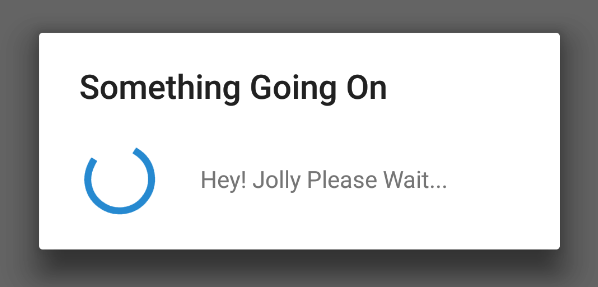
Activity’s onCreate method add following code
progressDialog = new ProgressDialog(this);
After the onCreate method add below two methods to show and hide ProgressBar loader.
    // Method to show Progress bar
    private void showProgressDialogWithTitle(String title,String substring) {
        progressDialog.setProgressStyle(ProgressDialog.STYLE_SPINNER);
        //Without this user can hide loader by tapping outside screen
        progressDialog.setCancelable(false);
        //Setting Title
        progressDialog.setTitle(title);
        progressDialog.setMessage(substring);
        progressDialog.show();

    }

    // Method to hide/ dismiss Progress bar
    private void hideProgressDialogWithTitle() {
        progressDialog.setProgressStyle(ProgressDialog.STYLE_SPINNER);
        progressDialog.dismiss();
    }
Show Progress Bar with Title, Text and Progress Percentage of Downloading beside loader icon.
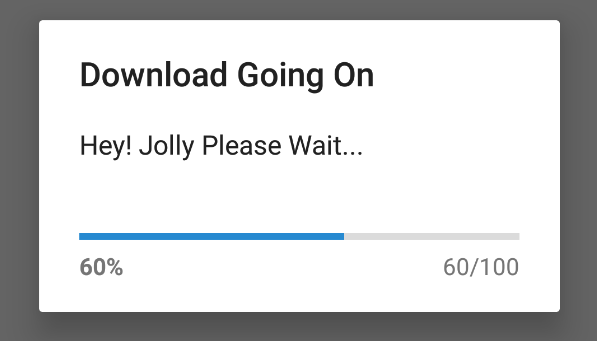
Add the following code before onCreate method.
    ProgressDialog progressDialog;
    private int progressStatus = 0;
    private Handler handler = new Handler();
Activity’s onCreate method add following code
progressDialog = new ProgressDialog(this);After the onCreate method add below two methods to show and hide ProgressBar loader.
    // Method to show Progress bar
    private void showProgressDialogWithTitle(String title,String substring) {
        progressDialog.setTitle(title);
        progressDialog.setMessage(substring);
        progressDialog.setProgressStyle(ProgressDialog.STYLE_HORIZONTAL);
        progressDialog.setCancelable(false);
        progressDialog.setMax(100);
        progressDialog.show();

        // Start Process Operation in a background thread
        new Thread(new Runnable() {
            public void run() {
                while (progressStatus < 100) {
                    try{
                        // This is mock thread using sleep to show progress
                        Thread.sleep(200);
                        progressStatus += 5;
                    } catch (InterruptedException e){
                        e.printStackTrace();
                    }
                    // Change percentage in the progress bar
                    handler.post(new Runnable() {
                        public void run() {
                            progressDialog.setProgress(progressStatus);
                        }
                    });
                }
                //hide Progressbar after finishing process
                hideProgressDialogWithTitle();
            }
        }).start();

    }

    // Method to hide/ dismiss Progress bar
    private void hideProgressDialogWithTitle() {
        progressDialog.setProgressStyle(ProgressDialog.STYLE_SPINNER);
        progressDialog.dismiss();
    }
let me know if you face any issue.
Happy coding… 🙂