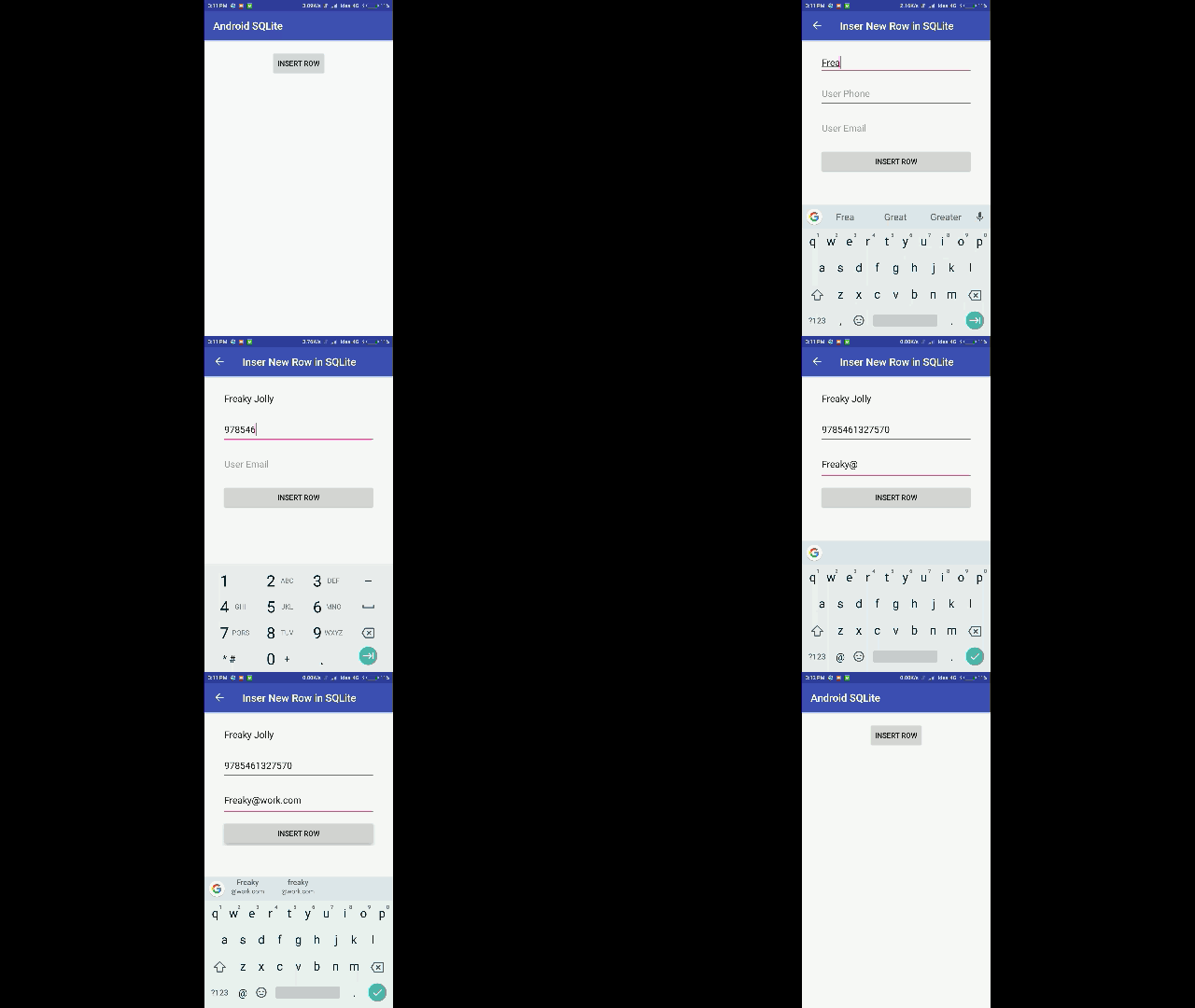
UPDATE: See Complete Application Example Here
Previous Part 1: Android SQLite: Integration.
Part 2: Insert Rows in SQLite Android App
In the previous post we worked on the integration of SQLite then we created Database and Table. Now we will Create a new Activity to insert a new row in Database.
So let’s start
Step 1) Add a button in activity_layout.xml to open a new Activity( InsertRowActivity)
<?xml version="1.0" encoding="utf-8"?>
<android.support.constraint.ConstraintLayout xmlns:android="http://schemas.android.com/apk/res/android"
    xmlns:app="http://schemas.android.com/apk/res-auto"
    xmlns:tools="http://schemas.android.com/tools"
    android:layout_width="wrap_content"
    android:layout_height="wrap_content"
    android:layout_gravity="center_horizontal"
    android:layout_marginTop="20dp"
    tools:context=".MainActivity">


    <TableLayout
        android:layout_width="wrap_content"
        android:layout_height="wrap_content"
        android:gravity="center_vertical|center_horizontal">


        <TableRow
            android:layout_width="match_parent"
            android:layout_height="match_parent">

            <Button
                android:id="@+id/insertRow"
                android:layout_width="wrap_content"
                android:layout_height="wrap_content"
                android:layout_marginBottom="10dp"
                android:onClick="insertRowActivity"
                android:text="Insert Row" />
        </TableRow>


    </TableLayout>

</android.support.constraint.ConstraintLayout>

Now in MainActivity.java define onClick method insertRowActivity
public class MainActivity extends AppCompatActivity {

    UsersDatabaseAdapter usersDatabaseAdapter;

    @Override
    protected void onCreate(Bundle savedInstanceState) {
        super.onCreate(savedInstanceState);
        setContentView(R.layout.activity_main);

        // create the instance of Databse
        usersDatabaseAdapter=new UsersDatabaseAdapter(getApplicationContext());
    }

    public void insertRowActivity(View view) {
        Intent myIntent = new Intent(MainActivity.this, InsertRowActivity.class);
        MainActivity.this.startActivity(myIntent);
    }

}
In this method, we are just opening InsertRowActivity.
Step 2) Create a new activity ( InsertRowActivity ). Right click on root package > New > Activity > Empty Activity 
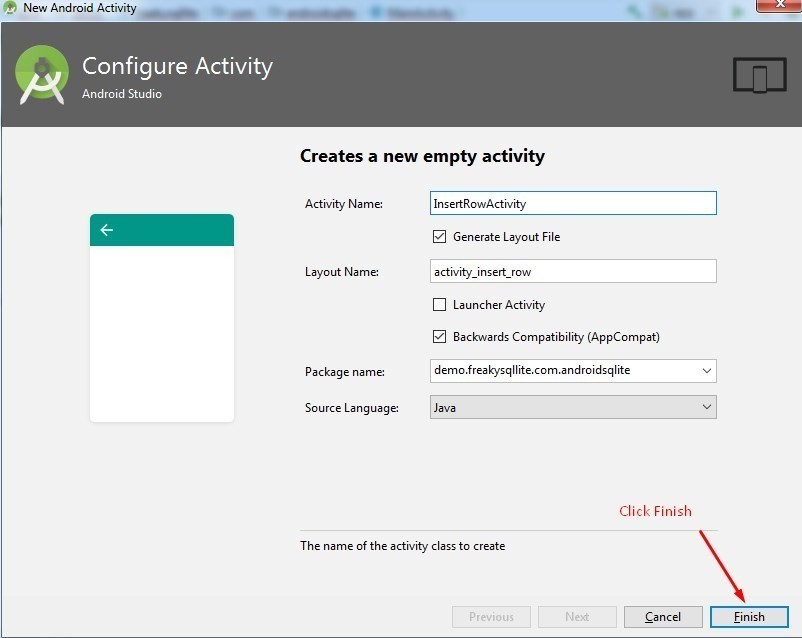
InsertRowActivity.java will look like this. I will explain methods in a while.
public class InsertRowActivity extends AppCompatActivity {

    private TextView mUserName;
    private TextView mUserPhone;
    private TextView mUserEmail;
    private Button insertRowFrom;

    @Override
    protected void onCreate(Bundle savedInstanceState) {
        super.onCreate(savedInstanceState);
        setContentView(R.layout.activity_insert_row);
        //Toolbar toolbar = (Toolbar) findViewById(R.id.toolbar);
        //setSupportActionBar(toolbar);


        insertRowFrom = (Button) findViewById(R.id.insertRowFrom);
        mUserName = (TextView) findViewById(R.id.userNameTxt);
        mUserPhone = (TextView) findViewById(R.id.userPhoneTxt);
        mUserEmail = (TextView) findViewById(R.id.userEmailTxt);


        ActionBar actionBar = getSupportActionBar();
        if (actionBar != null) {
            actionBar.setDisplayHomeAsUpEnabled(true);
            actionBar.setTitle("Inser New Row in SQLite");
        }
    }

    public void insertRow(View view) {

        TextView userNameTxtView = findViewById(R.id.userNameTxt);
        TextView userPhoneTxtView = findViewById(R.id.userPhoneTxt);
        TextView userEmailTxtView = findViewById(R.id.userEmailTxt);

        if(userNameTxtView.getText().toString().trim().equals("")
                || userPhoneTxtView.getText().toString().trim().equals("")
                || userEmailTxtView.getText().toString().trim().equals("")){
            toast("Please Fill All Fields ");
        }else{
            UsersDatabaseAdapter.insertEntry(userNameTxtView.getText().toString().trim(),userPhoneTxtView.getText().toString(),userEmailTxtView.getText().toString());
            Intent myIntent = new Intent(InsertRowActivity.this, MainActivity.class);
            InsertRowActivity.this.startActivity(myIntent);
        }

    }

    public boolean onOptionsItemSelected(MenuItem item){
        switch (item.getItemId()) {
            case android.R.id.home:
                finish();
                return true;
        }
        return super.onOptionsItemSelected(item);
    }

    public boolean onCreateOptionsMenu(Menu menu) {
        return true;
    }

}
NOTE: Mostly I use xdroid’s toast in projects you can find installation guide and advantages here
In InsertRowActivity we will have three EditText fields and a Button to get values from EditText and Insert a row in the database.
activity_insert_row.xml will have three EditText to take values from user and a button to save values, it will look like as below
<?xml version="1.0" encoding="utf-8"?>
<android.support.constraint.ConstraintLayout xmlns:android="http://schemas.android.com/apk/res/android"
    xmlns:app="http://schemas.android.com/apk/res-auto"
    xmlns:tools="http://schemas.android.com/tools"
    android:layout_width="wrap_content"
    android:layout_height="wrap_content"
    android:layout_gravity="center_horizontal"
    android:layout_marginTop="20dp"
    tools:context=".InsertRowActivity">


    <TableLayout
        android:layout_width="wrap_content"
        android:layout_height="wrap_content">

        <TableRow
            android:layout_width="match_parent"
            android:layout_height="match_parent">

            <EditText
                android:id="@+id/userNameTxt"
                android:layout_width="293dp"
                android:layout_height="wrap_content"
                android:layout_marginBottom="10dp"
                android:hint="User Name"
                android:inputType="textPersonName" />
        </TableRow>

        <TableRow
            android:layout_width="match_parent"
            android:layout_height="match_parent">

            <EditText
                android:id="@+id/userPhoneTxt"
                android:layout_width="289dp"
                android:layout_height="53dp"
                android:layout_marginBottom="10dp"
                android:hint="User Phone"
                android:inputType="phone" />
        </TableRow>

        <TableRow
            android:layout_width="match_parent"
            android:layout_height="match_parent">

            <EditText
                android:id="@+id/userEmailTxt"
                android:layout_width="291dp"
                android:layout_height="59dp"
                android:layout_marginBottom="10dp"
                android:hint="User Email"
                android:inputType="textEmailAddress" />
        </TableRow>

        <TableRow
            android:layout_width="match_parent"
            android:layout_height="match_parent">

            <Button
                android:id="@+id/insertRowFrom"
                android:layout_width="wrap_content"
                android:layout_height="wrap_content"
                android:onClick="insertRow"
                android:text="Insert Row" />
        </TableRow>
    </TableLayout>


</android.support.constraint.ConstraintLayout>
In UsersDatabaseAdapter.java which we created in the previous post, we will add a new method (insertEntry) to Insert row data in the database and getRowCount to return total rows in the table.
public class UsersDatabaseAdapter {
    static final String DATABASE_NAME = "UsersDatabase.db";
    static final String TABLE_NAME = "USERS";
    static final int DATABASE_VERSION = 1;
    // SQL Statement to create a new database.
    static final String DATABASE_CREATE = "create table "+TABLE_NAME+"( ID integer primary key autoincrement,user_name  text,user_phone  text,user_email text); ";
    private static final String TAG = "UsersDatabaseAdapter:";

    // Variable to hold the database instance
    public static SQLiteDatabase db;
    // Context of the application using the database.
    private final Context context;
    // Database open/upgrade helper
    private static DataBaseHelper dbHelper;
    public  UsersDatabaseAdapter(Context _context)
    {
        context = _context;
        dbHelper = new DataBaseHelper(context, DATABASE_NAME, null, DATABASE_VERSION);
    }

    // Method to open the Database
    public  UsersDatabaseAdapter open() throws SQLException
    {
        db = dbHelper.getWritableDatabase();
        return this;
    }

    // Method to close the Database
    public void close()
    {
        db.close();
    }

    // method returns an Instance of the Database
    public  SQLiteDatabase getDatabaseInstance()
    {
        return db;
    }

    // method to insert a record in Table
    public static String insertEntry(String user_name, String user_phone, String user_email)
    {

        try {


            ContentValues newValues = new ContentValues();
            // Assign values for each column.
            newValues.put("user_name", user_name);
            newValues.put("user_phone", user_phone);
            newValues.put("user_email", user_email);

            // Insert the row into your table
            db = dbHelper.getWritableDatabase();
            long result=db.insert(TABLE_NAME, null, newValues);
            toast("User Info Saved! Total Row Count is "+getRowCount());
            db.close();

        }catch(Exception ex) {
        }
        return "ok";
    }


    // method to get the password  of userName
    public static int getRowCount()
    {
        db=dbHelper.getReadableDatabase();
        Cursor cursor=db.query(TABLE_NAME, null, null, null, null, null, null);
        toast("Row Count is "+cursor.getCount());
        db.close();
        return cursor.getCount();
    }

}
Find Source code here
After this our app will be able to insert user data in the database.